
Summer Certification Sale Special Limited Time 70% Discount Offer - Ends in 0d 00h 00m 00s - Coupon code: scxmas70

Associate-Cloud-Engineer Exam Dumps - Google Cloud Certified - Associate Cloud Engineer

Searching for workable clues to ace the Google Associate-Cloud-Engineer Exam? You’re on the right place! ExamCert has realistic, trusted and authentic exam prep tools to help you achieve your desired credential. ExamCert’s Associate-Cloud-Engineer PDF Study Guide, Testing Engine and Exam Dumps follow a reliable exam preparation strategy, providing you the most relevant and updated study material that is crafted in an easy to learn format of questions and answers. ExamCert’s study tools aim at simplifying all complex and confusing concepts of the exam and introduce you to the real exam scenario and practice it with the help of its testing engine and real exam dumps

Go to page:
Question # 65

You have an on-premises data analytics set of binaries that processes data files in memory for about 45 minutes every midnight. The sizes of those data files range from 1 gigabyte to 16 gigabytes. You want to migrate this application to Google Cloud with minimal effort and cost. What should you do?

A.

Upload the code to Cloud Functions. Use Cloud Scheduler to start the application.

B.

Create a container for the set of binaries. Use Cloud Scheduler to start a Cloud Run job for the container.

C.

Create a container for the set of binaries Deploy the container to Google Kubernetes Engine (GKE) and use the Kubernetes scheduler to start the application.

D.

Lift and shift to a VM on Compute Engine. Use an instance schedule to start and stop the instance.

Full Access
Question # 66

Your managed instance group raised an alert stating that new instance creation has failed to create new instances. You need to maintain the number of running instances specified by the template to be able to process expected application traffic. What should you do?

A.

Create an instance template that contains valid syntax which will be used by the instance group. Delete any persistent disks with the same name as instance names.

B.

Create an instance template that contains valid syntax that will be used by the instance group. Verify that the instance name and persistent disk name values are not the same in the template.

C.

Verify that the instance template being used by the instance group contains valid syntax. Delete any persistent disks with the same name as instance names. Set the disks.autoDelete property to true in the instance template.

D.

Delete the current instance template and replace it with a new instance template. Verify that the instance name and persistent disk name values are not the same in the template. Set the disks.autoDelete property to true in the instance template.

Full Access
Question # 67

You have a Compute Engine instance hosting an application used between 9 AM and 6 PM on weekdays. You want to back up this instance daily for disaster recovery purposes. You want to keep the backups for 30 days. You want the Google-recommended solution with the least management overhead and the least number of services. What should you do?

A.

1. Update your instances’ metadata to add the following value: snapshot–schedule: 0 1 * * *2. Update your instances’ metadata to add the following value: snapshot–retention: 30

B.

1. In the Cloud Console, go to the Compute Engine Disks page and select your instance’s disk.2. In the Snapshot Schedule section, select Create Schedule and configure the following parameters:–Schedule frequency: Daily–Start time: 1:00 AM – 2:00 AM–Autodelete snapshots after 30 days

C.

1. Create a Cloud Function that creates a snapshot of your instance’s disk.2.Create a Cloud Function that deletes snapshots that are older than 30 days.3.Use Cloud Scheduler to trigger both Cloud Functions daily at 1:00 AM.

D.

1. Create a bash script in the instance that copies the content of the disk to Cloud Storage.2.Create a bash script in the instance that deletes data older than 30 days in the backup Cloud Storage bucket.3.Configure the instance’s crontab to execute these scripts daily at 1:00 AM.

Full Access
Question # 68

You want to configure an SSH connection to a single Compute Engine instance for users in the dev1 group. This instance is the only resource in this particular Google Cloud Platform project that the dev1 users should be able to connect to. What should you do?

A.

Set metadata to enable-oslogin=true for the instance. Grant the dev1 group the compute.osLogin role. Direct them to use the Cloud Shell to ssh to that instance.

B.

Set metadata to enable-oslogin=true for the instance. Set the service account to no service account for that instance. Direct them to use the Cloud Shell to ssh to that instance.

C.

Enable block project wide keys for the instance. Generate an SSH key for each user in the dev1 group. Distribute the keys to dev1 users and direct them to use their third-party tools to connect.

D.

Enable block project wide keys for the instance. Generate an SSH key and associate the key with that instance. Distribute the key to dev1 users and direct them to use their third-party tools to connect.

Full Access
Question # 69

You have developed a web application that serves traffic for a local event and are expecting unpredictable traffic. You have containerized the application, and you now want to deploy the application on Google Cloud. You also want to minimize costs. What should you do?

A.

Deploy the web application as a Cloud Run service.

B.

Deploy the web application on Google Kubernetes Engine In Standard mode.

C.

Deploy the web application as a Cloud Run job.

D.

Deploy the web application on Google Kubernetes Engine in Autopilot mode.

Full Access
Question # 70

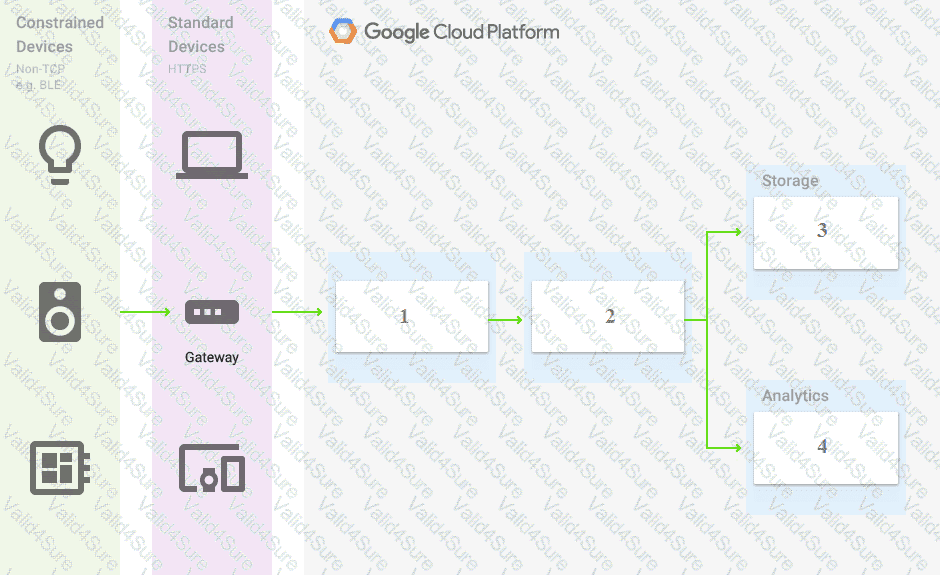
You are building a pipeline to process time-series data. Which Google Cloud Platform services should you put in boxes 1,2,3, and 4?
A.

Cloud Pub/Sub, Cloud Dataflow, Cloud Datastore, BigQuery

B.

Firebase Messages, Cloud Pub/Sub, Cloud Spanner, BigQuery

C.

Cloud Pub/Sub, Cloud Storage, BigQuery, Cloud Bigtable

D.

Cloud Pub/Sub, Cloud Dataflow, Cloud Bigtable, BigQuery

Full Access
Question # 71

You have designed a solution on Google Cloud Platform (GCP) that uses multiple GCP products. Your company has asked you to estimate the costs of the solution. You need to provide estimates for the monthly total cost. What should you do?

A.

For each GCP product in the solution, review the pricing details on the products pricing page. Use the pricing calculator to total the monthly costs for each GCP product.

B.

For each GCP product in the solution, review the pricing details on the products pricing page. Create a Google Sheet that summarizes the expected monthly costs for each product.

C.

Provision the solution on GCP. Leave the solution provisioned for 1 week. Navigate to the Billing Report page in the Google Cloud Platform Console. Multiply the 1 week cost to determine the monthly costs.

D.

Provision the solution on GCP. Leave the solution provisioned for 1 week. Use Stackdriver to determine the provisioned and used resource amounts. Multiply the 1 week cost to determine the monthly costs.

Full Access
Question # 72

You are working with a user to set up an application in a new VPC behind a firewall. The user is concerned about data egress. You want to configure the fewest open egress ports. What should you do?

A.

Set up a low-priority (65534) rule that blocks all egress and a high-priority rule (1000) that allows only the appropriate ports.

B.

Set up a high-priority (1000) rule that pairs both ingress and egress ports.

C.

Set up a high-priority (1000) rule that blocks all egress and a low-priority (65534) rule that allows only the appropriate ports.

D.

Set up a high-priority (1000) rule to allow the appropriate ports.

Full Access
Go to page: