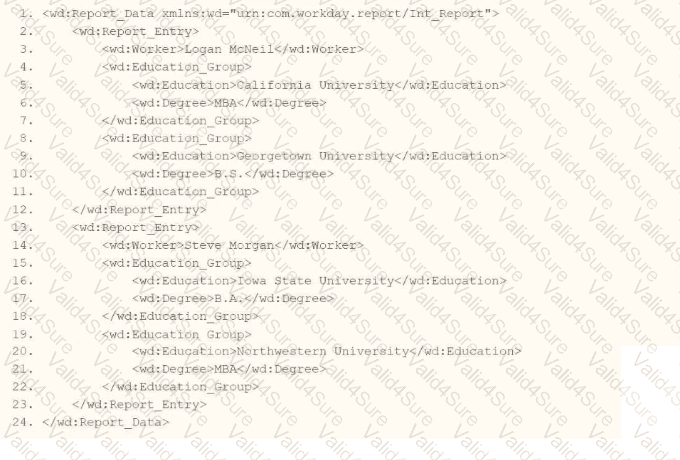
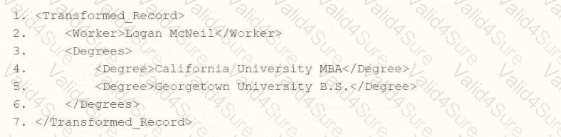
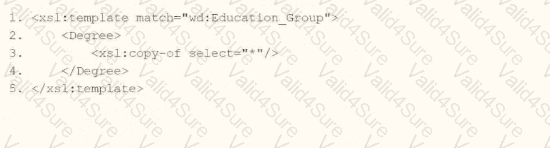
In Workday integrations, XSLT is used to transform XML data, such as the output from a web service-enabled report or EIB, into a desired format for third-party systems. In this scenario, you need to create an XSLT template that matches the wd:Education_Group element in the provided XML and transforms it to produce the degree data in the format shown in the Transformed_Record example. The goal is to output each degree (e.g., " California University MBA " and " Georgetown University B.S. " ) as a < Degree > element within a < Degrees > parent element.
Here’s why option A is correct:
Template Matching: The < xsl:template match= " wd:Education_Group " > correctly targets the wd:Education_Group element in the XML, which contains multiple wd:Education elements, each with a wd:Degree child, as shown in the XML snippet (e.g., < wd:Education > California University < /wd:Education > < wd:Degree > MBA < /wd:Degree > ).
< xsl:copy > < xsl:value-of select= " * " / > < /xsl:copy > copies the content of the child elements (wd:Education and wd:Degree) and concatenates their values into a single string. The select= " * " targets all child elements of wd:Education_Group, and xsl:value-of outputs their text content (e.g., " California University " and " MBA " become " California University MBA " ).
Context and Output: The template operates on each wd:Education_Group, producing the nested structure shown in the Transformed_Record (e.g., < Degrees > < Degree > California University MBA < /Degree > < Degree > Georgetown University B.S. < /Degree > < /Degrees > ), assuming a parent template or additional logic wraps the < Degree > elements in < Degrees > .
Why not the other options?
xml
WrapCopy
< xsl:template match= " wd:Education_Group " >
< Degree >
< xsl:value-of select= " * " / >
< /Degree >
< /xsl:template >
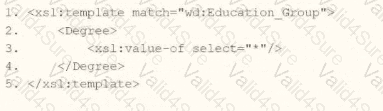
This uses < xsl:value-of select= " * " / > without < xsl:copy > , which outputs the concatenated text of all child elements but does not preserve any XML structure or formatting. It would produce plain text (e.g., " California UniversityMBACalifornia UniversityB.S. " ) without the proper < Degree > tags, failing to match the structured output in the example.
xml
WrapCopy
< xsl:template match= " wd:Education_Group " >
< Degree >
< xsl:copy select= " * " / >
< /Degree >
< /xsl:template >
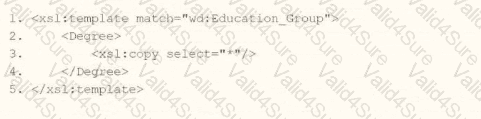
This uses < xsl:copy select= " * " / > , but < xsl:copy > does not take a select attribute—it simply copies the current node. This would result in an invalid XSLT syntax and fail to produce the desired output, making it incorrect.
xml
WrapCopy
< xsl:template match= " wd:Education_Group " >
< Degree >
< xsl:copy-of select= " * " / >
< /Degree >
< /xsl:template >
This uses < xsl:copy-of select= " * " / > , which copies all child nodes (e.g., wd:Education and wd:Degree) as-is, including their element structure, resulting in output like < Degree > < wd:Education > California University < /wd:Education > < wd:Degree > MBA < /wd:Degree > < /Degree > . This does not match the flattened, concatenated text format in the Transformed_Record example (e.g., < Degree > California University MBA < /Degree > ), making it incorrect.
To implement this in XSLT for a Workday integration:
Use the template from option A to match wd:Education_Group, apply < xsl:copy > < xsl:value-of select= " * " / > < /xsl:copy > to concatenate and output the wd:Education and wd:Degree values as a single < Degree > element. This ensures the transformation aligns with the Transformed_Record example, producing the required format for the integration output.
Workday Pro Integrations Study Guide: Section on " XSLT Transformations for Workday Integrations " – Details the use of < xsl:template > , < xsl:copy > , and < xsl:value-of > for transforming XML data, including handling grouped elements like wd:Education_Group.
Workday EIB and Web Services Guide: Chapter on " XML and XSLT for Report Data " – Explains the structure of Workday XML (e.g., wd:Education_Group, wd:Education, wd:Degree) and how to use XSLT to transform education data into a flattened format.
Workday Reporting and Analytics Guide: Section on " Web Service-Enabled Reports " – Covers integrating report outputs with XSLT for transformations, including examples of concatenating and restructuring data for third-party systems.