
Summer Certification Sale Special Limited Time 70% Discount Offer - Ends in 0d 00h 00m 00s - Coupon code: scxmas70

UiPath-ADPv1 Exam Dumps - UiPath Automation Developer Professional Exam (2024.10) (ADPv1)

Searching for workable clues to ace the UiPath UiPath-ADPv1 Exam? You’re on the right place! ExamCert has realistic, trusted and authentic exam prep tools to help you achieve your desired credential. ExamCert’s UiPath-ADPv1 PDF Study Guide, Testing Engine and Exam Dumps follow a reliable exam preparation strategy, providing you the most relevant and updated study material that is crafted in an easy to learn format of questions and answers. ExamCert’s study tools aim at simplifying all complex and confusing concepts of the exam and introduce you to the real exam scenario and practice it with the help of its testing engine and real exam dumps

Go to page:
Question # 17

Following UiPath best practices, which project structure is best-suited for complex processes in UiPath Studio?

A.

Sequence

B.

Flowchart

C.

Global Exception Handler

D.

State Machine

Full Access
Question # 18

When should a developer log a coherent message with the Logging Level set as " Info " while building an automation project?

A.

Every time data is read from external sources.

B.

Every time an exception is caught in a Catch block

C.

Every time a variable or argument value is used.

D.

Every time the robot encounters an error processing a Queue Item.

Full Access
Question # 19

While troubleshooting a process developed using the Robotic Enterprise (RE) Framework, you have placed a breakpoint at the " Invoke InitAllSettings " workflow activity.
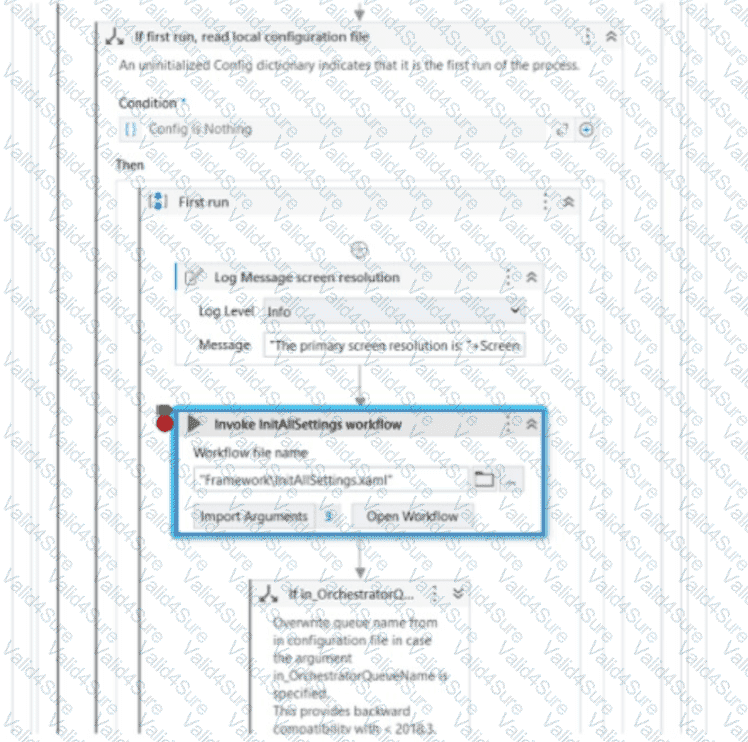
Given the current state of the Executor, what will occur when you click on the Step Over button?

    Executor directs to the " If in_OrchestratorQ ... " activity

    Executor directs to the first InitAllSettings workflow activity

    Executor directs to the first activity outside " If first run, read local configuration "

A.

Executor directs to the " First Run " sequence

Full Access
Question # 20

A developer configured the properties for a Click activity as shown below:
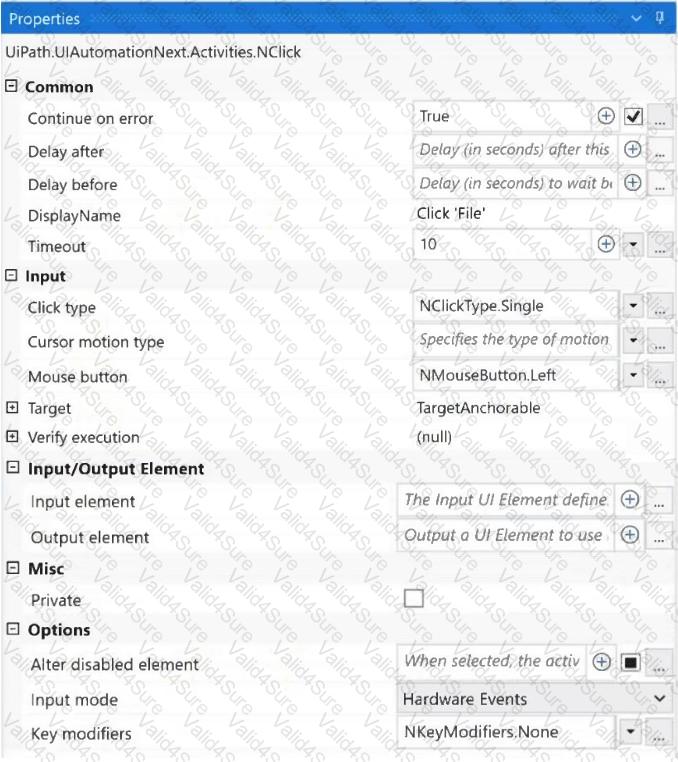
What happens if the activity cannot find its target at runtime?

A.

An exception is thrown after 10 milliseconds.

B.

An exception is thrown after 10 seconds.

C.

The next activity is executed after 10 seconds.

D.

The next activity is executed after 10 milliseconds.

Full Access
Question # 21

In the context of the REFramework, if the OrchestratorQueueName key is present in both the Settings and Assets sheets, but an asset with the corresponding name is not present in Orchestrator, what will be the behavior at run time?

A.

An empty string will be saved for the " OrchestratorQueueName " key in the config dictionary.

B.

The flow will throw an exception in InitAllSettings workflow.

C.

The " OrchestratorQueueName " key is not added to the config dictionary and the flow will throw in Get Transaction Data workflow.

D.

The flow will use the value from the Settings sheets since the asset is missing.

Full Access
Question # 22

Which of the following examples accurately demonstrates the correct usage of Al Computer Vision features in a UiPath project?

A.

Employing Al Computer Vision to identify and interact with Ul elements in a remote desktop application with low quality or scaling issues.

B.

Utilizing Al Computer Vision to train a custom machine learning model to recognize specific patterns in data.

C.

Using Al Computer Vision to extract plain text from a scanned PDF document and store the output in a string variable.

D.

Applying Al Computer Vision to perform sentiment analysis on a provided text string and displaying the result.

Full Access
Question # 23

Which of the following activities in UlPath Studio have the Verify Execution property available?

A.

Click activity

B.

Invoke workflow activity

C.

If activity

D.

Assign activity

Full Access
Question # 24

What is the purpose of the Interval filter in the Orchestrator ' s Monitoring page?

A.

It enables you to sort the displayed data based on job priorities.

B.

It allows you to choose between background and foreground processes for the displayed data.

C.

It allows you to allocate licenses per machine for the displayed data.

D.

It allows you to control the granularity of the displayed data and check the health of your system in either the last day or the last hour.

Full Access
Go to page: