
F5CAB1 Exam Dumps - BIG-IP Administration Install, Initial Configuration, and Upgrade
Searching for workable clues to ace the F5 F5CAB1 Exam? You’re on the right place! ExamCert has realistic, trusted and authentic exam prep tools to help you achieve your desired credential. ExamCert’s F5CAB1 PDF Study Guide, Testing Engine and Exam Dumps follow a reliable exam preparation strategy, providing you the most relevant and updated study material that is crafted in an easy to learn format of questions and answers. ExamCert’s study tools aim at simplifying all complex and confusing concepts of the exam and introduce you to the real exam scenario and practice it with the help of its testing engine and real exam dumps
Which two items demonstrate the creation of a new volume for software images?
(Choose two.)
For security reasons, a BIG-IP Administrator needs to specify allowable IP ranges for access to the Configuration Utility (WebUI).
The exhibit shows the User Administration section of the Configuration Utility.
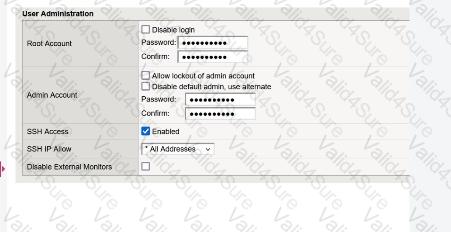
The administrator could not find any setting that explicitly restricts access to the Configuration Utility.
Which one of the following is a reason for that?
The BIG-IP Administrator received a ticket that an authorized user is attempting to connect to the Configuration Utility from a jump host and is being denied.
The HTTPD allow list is configured as:
sys httpd {
allow { 172.28.31.0/255.255.255.0 172.28.65.0/255.255.255.0 }
}
The jump host IP is 172.28.32.22 .
What command should the BIG-IP Administrator use to allow HTTPD access for this jump host?
In order to configure allowed IP addresses for SSH access to a BIG-IP device, the BIG-IP Administrator has issued the commands shown in the exhibit.
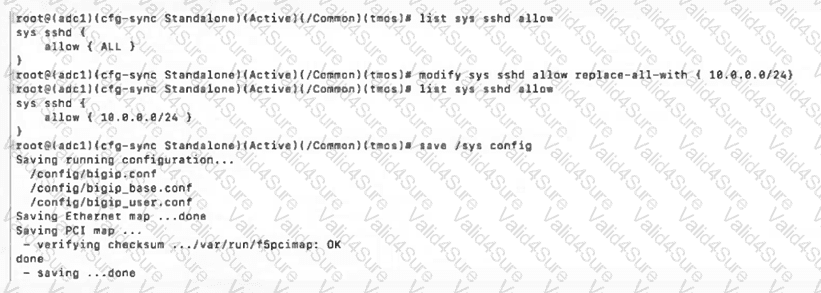
Which IP addresses will have SSH access after issuing the shown commands?
(Choose two.)
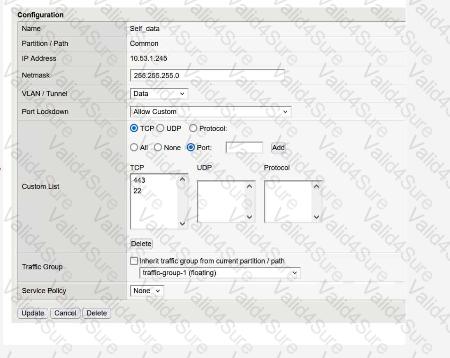
The monitoring team reports that the SNMP server is unable to poll data from a BIG-IP device.
What information will help the BIG-IP Administrator determine whether the issue originates from the BIG-IP system?